macOS 13+ · MIT · universal build

Know which account
has room left.

Janus switches between your Claude Code accounts from the menu bar, and shows how much of each one’s limits you have spent.

$ brew install --cask --no-quarantine ramitvishwakarma/tap/janus
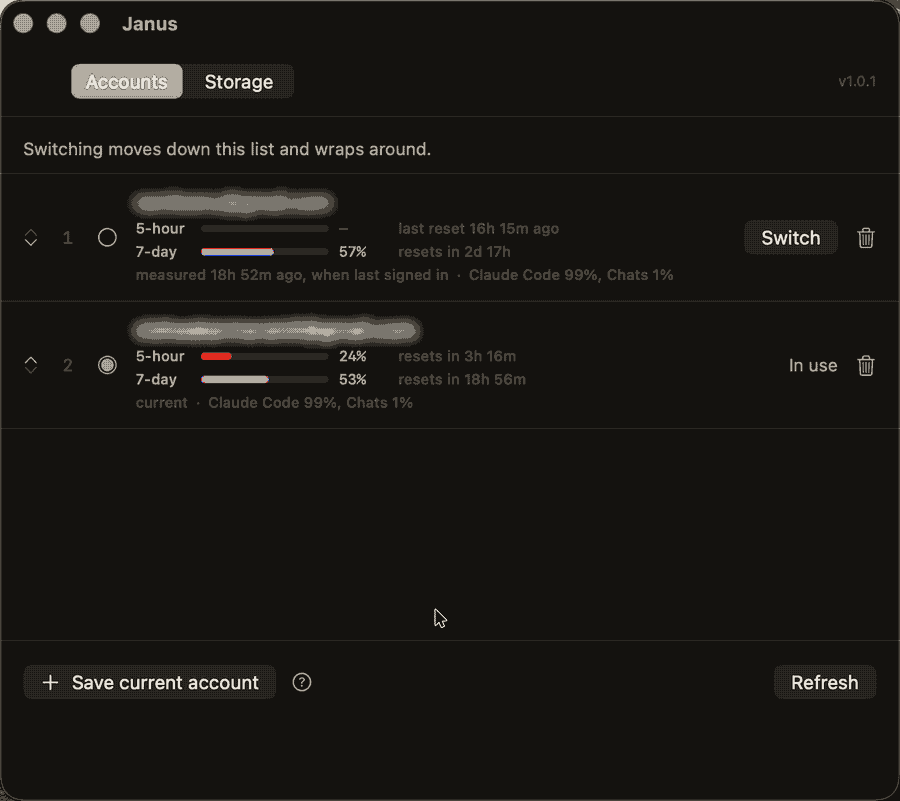
Switching between two saved Claude Code accounts in the Janus window
One click moves the live session, and the saved one is kept.
2 thingsA keychain entry and ~/.claude.json. That pair is the whole session.
0 serversNo telemetry and no network code anywhere in the repository.
1 clickOr ⌘S from the menu bar, without opening the window.

What it does

Switches accounts

Signing in as another account normally means signing out first and typing the whole thing again. Janus saves each account’s session and puts it back on demand, so the second account is one click away instead of one login away. ⌘S moves through them in the order you choose.

Shows what each has spent

Every saved account carries its five-hour and weekly usage, read from the file Claude Code writes. That is the number worth looking at when the decision in front of you is which account to use next.

Clears developer caches

A measured list of package manager, build, browser and editor caches, with what each one costs to lose. Everything moves to the Trash rather than being deleted, so any decision can be taken back.

Account one94%
Five-hour limit, nearly gone.
Account two5%
Barely touched. This is the one to switch to.

The signed-in account’s figures are read live from the file Claude Code writes. A saved account’s are the ones it wrote when it was last signed in, so Janus says when they were measured rather than passing them off as current, and draws a limit whose reset has gone by as empty rather than full.

How switching works

A signed-in Claude Code session is two things on disk.

PartWhere it lives
OAuth tokensKeychain entry Claude Code-credentials
Everything else~/.claude.json

Switching moves that pair. Janus reads the replacement session first, copies the live pair into storage under the account it belongs to, then writes the other account’s saved pair into place. Claude Code reads credentials at startup, so restart it to pick up the new account.

Before you trust it

Nothing leaves your MacNo server, no telemetry, and no network code in the repository.
A failed switch changes nothingEvery switch fetches the replacement session before touching anything live, and saves the session it is about to displace. Decline a keychain prompt halfway and you stay signed into the account you started on.
Your settings file survives~/.claude.json belongs to another program and gains keys between releases, so Janus parses what it needs and writes the rest back byte for byte.
Nothing is deletedCache clearing calls FileManager.trashItem. It refuses anything outside your home directory, which the code enforces, with a test asserting every entry in the catalogue passes.
An account signed in elsewhere is keptIf the live account is not one Janus knows about, it is saved as a new account rather than overwritten, because those credentials exist nowhere else.

Install

$ brew install --cask --no-quarantine ramitvishwakarma/tap/janus

Or download the latest release and drag Janus to Applications. I sign the build ad-hoc rather than with a paid Apple Developer certificate, so macOS puts a quarantine flag on it and refuses to open it the first time. Clear the flag once:

$ xattr -dr com.apple.quarantine /Applications/Janus.app

Or build it yourself. It needs the Xcode Command Line Tools, not Xcode.

$ git clone https://github.com/RamitVishwakarma/Janus.git $ cd Janus && ./build.sh